Device Details
Overview
| Name | Version: | Studio Utility 1.0.0 |
| Author: | pedestrianjpn |
| Device Type: | Audio Effect |
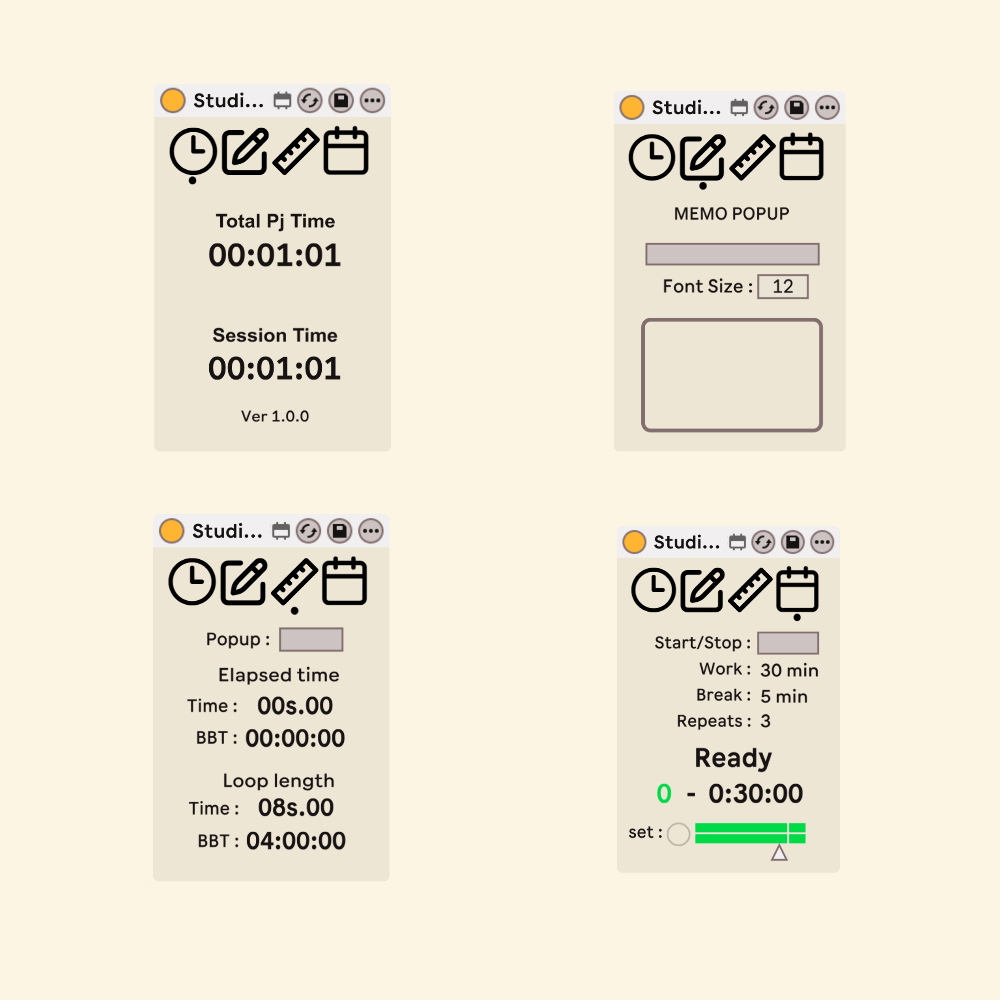
| Description: | DL : https://payhip.com/b/1n9p0 Four studio tools in one compact Max for Live device. Studio Utility combines a project time counter, a pop-up memo pad, a loop measurement display, and a Pomodoro-style focus timer — switchable with a single click on the icon toolbar at the top. All four tools keep running in the background, so switching views never interrupts what they are doing. Features Icon Toolbar Four icons at the top of the device switch between the tools: Time, Memo, Measure, and Pomodoro. A small dot under the icon shows which view is active. Switching is display-only — every tool keeps working in the background, and changing tabs never touches your Live set's undo history. Time — Project & Session Time Counter Displays the cumulative duration of your project (Total Pj Time) and the duration of the current session (Session Time). When the project is saved, the total is preserved and resumes from the accumulated value at the next launch. The session timer resets each time the project is opened. Clicking a time display hides it, for those who find constant time tracking distracting. Memo — Pop-up Notepad A simple notepad for your Live set. Write a title on the device and open the pop-up window for longer notes. The font size is adjustable, and your text is saved with the Live set. Measure — Loop Length & Playback Position Shows the elapsed time from the loop start and the length of the current loop region, each in both musical units (Bars : Beats : Sixteenths) and real time (minutes / seconds). Both readouts follow the project's tempo and time signature. The display can also be opened as a floating window. Pomodoro — Focus Timer Set your Work Time, Break Time, and number of Repeats, press set, and hit Start/Stop. The device counts down each session and switches between work and break automatically. A short sine-wave beep announces every transition — a different pitch for work, break, and completion — with a Gain control to balance it against your music. No voice samples, no distractions: just a clean tone. Usage This is an Audio Effect device. It will function on any track; however, placing it on a track routed to the Master is recommended so the Pomodoro notification beeps are audible. Integrating it into your default project template is an effective way to ensure the time counter initializes automatically upon startup. Use the icon toolbar to switch tools at any time — all four continue to run whether they are displayed or not. Important Notes Switching tabs is intentionally designed not to be recorded in Live's undo history. As a trade-off, the selected tab is not stored with the Live set — the device always opens on the Time view. The Time counter records time by incrementing an internal counter every three minutes; durations under the threshold are truncated on save. As the counting process occurs within the M4L environment, these operations may occasionally be captured in the undo history. Please use it as a general reference rather than a tool for precision logging. Measure derives its real-time values from the current project tempo. If your project contains tempo automation, the displayed time reflects the tempo at the moment of measurement. The elapsed value may show a negative number when the playback position is before the loop start point. Changes to Work Time, Break Time, or Repeats do not take effect until you press set, which also returns the Pomodoro timer to the start. Miscellaneous This is a paid device. Please be advised that, due to the nature of digital downloads, refunds cannot be issued — we appreciate your understanding. If you would like to try the individual tools first, free versions of Measure, Basic Memo, and Project x Session Time Counter are available in the shop. Proceeds will be utilized to support the future development of Max for Live devices and related projects. |
Details
| Live Version Used: | 12.4.2 |
| Max Version Used: | 9.1.4 |
| Date Added: | Jul 15 2026 05:08:10 |
| Date Last Updated: | No Updates |
| Downloads: | 0 |
| Website: | https://payhip.com/b/1n9p0 |
| ⓘ License: | Commercial |
Average Rating
Log in to rate this device |
-n/a- |
Login to comment on this device.
Browse the full library